
Product page meta titles are HTML elements that define the title of a specific product page on search engine results pages (SERPs). To maximize search visibility and click-through rates, these titles must stay under 60 characters to prevent truncation while incorporating structured product details and high-intent transactional modifiers.
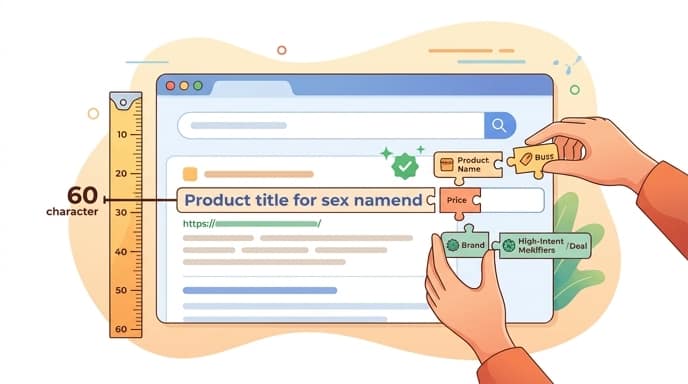
Ideal Character Limits and Why 50-60 Characters Matters
Product page meta titles should stay under 60 characters to prevent truncation in search engine results pages. According to SEO research published by SE Ranking, keeping your titles within this limit ensures that search engines display your full product name and key selling points without cutting them off with ellipses.
Google measures title tags in pixels rather than strict character counts. A standard desktop search result allows for up to 600 pixels of visible text, which typically equates to roughly 50 to 60 characters. Mobile screens sometimes allow slightly more vertical space, but they are highly susceptible to truncation based on device width.
When a meta title is truncated, critical information like the brand name or a key product feature can disappear. This reduces the clarity of your search listing, which directly harms your organic click-through rate (CTR).
High-Converting Formulas for E-Commerce Catalogs
Effective product meta titles use structured formats like [Product Name] – [Key Feature] – [Brand Name] to balance user clarity with search engine indexing. Utilizing a consistent structure, as highlighted by EcomSEO Academy, helps search crawlers understand the hierarchy of your page content while providing searchers with immediate context.
When deciding where to place your brand name, consider your brand equity. If you are a household name or a highly recognized brand, placing the brand name first can drive trust and clicks. For newer stores, dropshippers, or niche sites, it is highly recommended to place the brand name last, prioritizing the high-volume product keywords instead.
Use this quick checklist to evaluate your product page formulas:
- Product Name: Place the primary, high-volume keyword at the very beginning of the title.
- Key Feature: Add a defining attribute such as color, material, size, or model number.
- Brand Name: Include your store name at the end, separated by a hyphen or vertical pipe (|).
- Character Count: Verify that the entire string remains under the 60-character threshold.
Injecting Transactional Intent Modifiers
Transactional modifiers like buy, price, or specific category terms help target high-intent e-commerce searchers. As noted in catalog optimization guides by TinySEO, adding these modifiers captures users who are actively looking to make a purchase rather than just researching.
Strategic placement of words like “Buy,” “Shop,” or “Online” at the beginning of the title tag can signal immediate purchasing availability. However, you must balance these transactional keywords with natural language to avoid looking like spam.
Key takeaway: Aligning your meta titles with transactional intent ensures you capture users at the bottom of the purchase funnel, increasing conversion rates directly from the search results.
Avoid stuffing multiple modifiers into a single title. Choose one strong action word or price indicator that fits naturally within your character limit, ensuring the title remains readable and appealing to human searchers.
Scaling Meta Titles Across Large Inventories
Scaling meta titles for thousands of SKUs requires implementing rule-based templates within your CMS, such as Shopify or WooCommerce, to automate generation without creating duplicate content. Manual optimization is impossible for massive catalogs, making programmatic rules essential for maintaining SEO health.
By using variables in your e-commerce platform, you can automatically pull product attributes into your meta titles. For example, setting a template like {product_title} - {product_variant_color} | {shop_name} ensures that every product variant receives a unique, non-duplicate meta title automatically.
To incorporate seasonal or promotional modifiers (such as “Black Friday Sale” or “Holiday Special”) without manual overhead or permanent truncation, operators should use conditional, time-bound variables in their CMS templates. By setting a template logic like {product_title} | {brand_name} {if_promo: - Promo_Text}, the CMS dynamically appends the seasonal modifier only during active campaign dates. To prevent truncation, the system should automatically suppress secondary attributes (like variant colors or the brand name itself) whenever the promotional text is active, keeping the total string strictly under the 60-character limit.
If you are launching dedicated landing pages for your top-performing products, using an AI landing page generator can help you generate fully optimized, high-converting pages in minutes. For broader catalog management, platforms like PageHunter streamline the creation of structured, search-optimized product layouts that align perfectly with your automated meta title strategies.
FAQ
Why does Google rewrite my product page meta titles?
Google may rewrite your meta titles if they are too long, stuffed with repetitive keywords, or do not accurately match the user’s search query. Keeping your titles under 60 characters and highly relevant to the page content minimizes the likelihood of Google rewriting them.
Should I include the price in my product meta titles?
Including price indicators or modifiers like ‘Best Price’ can attract budget-conscious shoppers. However, if you include exact prices, ensure your CMS dynamically updates these values in the meta titles to prevent displaying outdated pricing to searchers.
How do I handle product variants like color or size in meta titles?
Use rule-based variables in your e-commerce platform to append the variant name (e.g., ‘[Product Name] – Blue, Size M’) to the title. This prevents duplicate title issues across similar product pages and targets long-tail search queries.
How do I add seasonal modifiers without breaking my templates?
Use conditional template logic in your CMS to dynamically inject promotional phrases like ‘Black Friday Sale’ during specific dates. Ensure your template automatically drops non-essential variables, such as variant details, during these periods to keep the title under the 60-character limit.